

Close Menu
    What's New

    Oldest Football Player Ever: The Incredible Story of Football’s Oldest Players

    July 25, 2026

    Top 10 Best Football Stadiums in the World (2026 Guide

    July 25, 2026

    Longest Football Match Ever Played: The Incredible Story Behind Football’s Longest Game

    July 25, 2026

    Football Boot Sizing Guide: How to Choose the Perfect Football Boot Size

    July 24, 2026

    Hat Trick Meaning in Football: Everything You Need to Know

    July 24, 2026
    Facebook X (Twitter) Instagram Pinterest
    • Home
    • Blog
    • About
    • Contact
    Facebook X (Twitter) Instagram Pinterest
    • Home
    • News
    • Football
    • Racing
    • Baseball
    • UFC
    • Rugby
    • Cricket
    • Snooker
    • Blog
    • Contact
    Home»Games»Why Does Noclipping in Source Games Make Graphics Do That?
    Games

    Why Does Noclipping in Source Games Make Graphics Do That?

    Garfield AndrewBy Garfield AndrewAugust 16, 2025No Comments4 Mins Read
    Why Does Noclipping in Source Games Make Graphics Do That
    Share
    Facebook Twitter LinkedIn Pinterest Email Copy Link

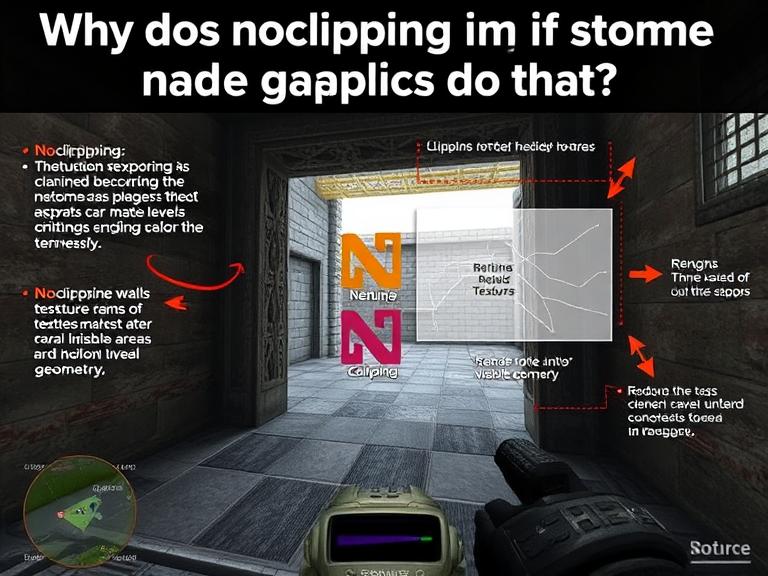
    Why Does Noclipping in Source Games Make Graphics Do That? If you’ve ever used the noclip command in a Source engine game (like *Half-Life 2*, Counter-Strike, or Portal), you’ve probably noticed some bizarre visual glitches. Textures stretch and warp, objects flicker in and out of existence, and entire sections of the map may disappear.

    Why does this happen? The answer lies in how the Source engine renders its environments—and why breaking its rules leads to such strange effects.

    In this article, we’ll explore:

    • How Source engine rendering works
    • Why noclip causes visual distortions
    • Technical explanations behind common glitches
    • FAQs about Source engine quirks

    Table of Contents

    • How the Source Engine Renders Game Worlds
      • 1. The Concept of “Visleafs” (Visibility Leaves)
      • 2. “Hulls” and Player Collision
    • Why Noclipping Breaks the Graphics
      • 1. The Engine Doesn’t Expect You to Be Outside the Map
      • 2. Z-Fighting (Texture Flickering)
      • 3. Missing Skybox & Unrendered Geometry
      • 4. Lighting and Shadow Glitches
    • Common Visual Glitches & Their Causes
    • Can These Glitches Be Fixed?
    • FAQs About Noclipping in Source Games
      • 1. Why do some objects disappear when I noclip?
      • 2. Can noclipping crash the game?
      • 3. Why do textures stretch infinitely?
      • 4. Do all Source games have this issue?
      • 5. Is there a way to noclip without glitches?
    • Conclusion

    How the Source Engine Renders Game Worlds

    1. The Concept of “Visleafs” (Visibility Leaves)

    The Source engine divides maps into “visleafs”—invisible boxes that determine what the player can see. Instead of rendering the entire map at once, the engine only draws what’s inside your current visleaf and adjacent ones.

    • Purpose: Improves performance by culling unseen geometry.
    • How it works: When you’re in a room, the engine hides walls, objects, and enemies in non-adjacent visleafs.

    2. “Hulls” and Player Collision

    The engine also uses collision hulls—simplified shapes around the player and objects to detect when they bump into walls. When you noclip, you bypass these hulls, allowing you to phase through solid geometry.

    Why Noclipping Breaks the Graphics

    1. The Engine Doesn’t Expect You to Be Outside the Map

    Since visleafs assume you’re following normal paths, noclip lets you escape the intended playable area. When you move outside, the engine:

    • Stops rendering certain areas (since they’re not in any active visleaf).
    • Fails to load distant textures properly, causing them to stretch or disappear.

    2. Z-Fighting (Texture Flickering)

    When you noclip inside walls, multiple surfaces may occupy the same space. The engine struggles to decide which one to render, causing flickering (“z-fighting”) as they compete for visibility.

    3. Missing Skybox & Unrendered Geometry

    Many maps use skybox textures to fake distant scenery. When you noclip beyond the map bounds:

    • The skybox disappears, revealing a void.
    • Unoptimized backfaces of walls become visible (often appearing as stretched, distorted textures).

    4. Lighting and Shadow Glitches

    Dynamic lighting relies on the player being in “valid” spaces. Noclipping into unintended areas can:

    • Break shadow calculations, making surfaces too dark or bright.
    • Disable light sources (since the engine thinks they shouldn’t affect you).

    Common Visual Glitches & Their Causes

    GlitchWhy It Happens
    Stretched texturesThe engine tries to fill gaps when you see “behind” geometry.
    Disappearing objectsYou leave their visleaf, so they unload to save performance.
    Flickering modelsZ-fighting between overlapping surfaces.
    Purple/black voidsMissing textures or unloaded map sections.
    Weird lightingBroken lightmap calculations in invalid areas.

    Can These Glitches Be Fixed?

    Most of these issues are engine limitations, but some mods/tricks help:

    • “mat_wireframe 1” – Shows wireframe models (helps debug rendering).
    • “r_drawclipbrushes 2” – Visualizes collision hulls (see why geometry disappears).
    • Map editors (Hammer) – Let developers manually adjust visleafs.

    However, these are developer tools—normal players can’t “fix” noclip glitches without modifying the game.

    FAQs About Noclipping in Source Games

    1. Why do some objects disappear when I noclip?

    They’re in a different visleaf that unloads when you’re not supposed to be there.

    2. Can noclipping crash the game?

    Sometimes! If you go too far out of bounds, the engine might fail to load critical map data, causing a crash.

    3. Why do textures stretch infinitely?

    The engine keeps trying to render surfaces from the wrong angle, distorting UV mapping.

    4. Do all Source games have this issue?

    Yes, because they share the same rendering system. *Half-Life 2*, TF2, Garry’s Mod, and Portal all behave similarly.

    5. Is there a way to noclip without glitches?

    No—the glitches are a side effect of breaking the engine’s rules. Some custom maps are designed for noclip exploration, though.

    Conclusion

    Noclipping in Source games creates bizarre graphics glitches because:

    1. Visleafs unload areas you’re not supposed to see.
    2. Collision hulls are ignored, exposing unfinished geometry.
    3. Lighting and textures break outside intended paths.

    These quirks are fundamental to how the Source engine optimizes rendering—so while they look strange, they’re a trade-off for better performance in normal gameplay.

    Share. Facebook Twitter Pinterest LinkedIn Tumblr Email Telegram Copy Link
    Garfield Andrew
    • Website

    Andrew Garfield is a Senior Sports Writer at Score808.co.uk, where he covers the latest news, match previews, predictions, transfer rumours, and in-depth analysis across football, cricket, UFC, rugby, baseball, horse racing, and snooker. With more than 12 years of experience in sports journalism, Andrew Garfield has built a reputation for producing accurate, engaging, and data-driven content that helps sports fans stay informed before every major event. His work focuses on breaking news, tactical analysis, betting insights, player performances, and tournament coverage from leagues and competitions around the world.

    Related Posts

    Oldest Football Player Ever: The Incredible Story of Football’s Oldest Players

    July 25, 2026

    Top 10 Best Football Stadiums in the World (2026 Guide

    July 25, 2026

    Longest Football Match Ever Played: The Incredible Story Behind Football’s Longest Game

    July 25, 2026

    Football Boot Sizing Guide: How to Choose the Perfect Football Boot Size

    July 24, 2026
    Latest Posts

    Oldest Football Player Ever: The Incredible Story of Football’s Oldest Players

    July 25, 2026

    Top 10 Best Football Stadiums in the World (2026 Guide

    July 25, 2026

    Longest Football Match Ever Played: The Incredible Story Behind Football’s Longest Game

    July 25, 2026

    Football Boot Sizing Guide: How to Choose the Perfect Football Boot Size

    July 24, 2026

    Hat Trick Meaning in Football: Everything You Need to Know

    July 24, 2026
    Popular Posts
    Badminton
    Badminton

    The Intricate World of Feather Badminton Supplier China

    By dadi yankiFebruary 8, 2025

    China has long been synonymous with dominating the badminton world—not just in player excellence but…

    Racing
    Racing

    Cycle Logic San Antonio Review: What Cyclists Should Know

    By Garfield AndrewFebruary 20, 2025

    Cycle Logic San Antonio has become a hot topic of discussion among local cyclists. While…

    Blog
    Blog

    Decoding Liverpool’s Role in the Premier League

    By Garfield AndrewFebruary 17, 2025

    Liverpool Football Club is a giant in the soccer world, captivating fans with its rich…

    About Us

    Score808.co.uk 15 Cliff St, New York NY 10038, USA +1 212-602-9641

    Email ID : buzztums@gmail.com

    Most Popular

    Navigating Super Bowl Season: Insights, Gear & More

    January 14, 2025

    Unlocking the Excitement of the 2024 Mosaic Football Checklist

    March 27, 2025
    Recent Posts

    Oldest Football Player Ever: The Incredible Story of Football’s Oldest Players

    July 25, 2026

    Top 10 Best Football Stadiums in the World (2026 Guide

    July 25, 2026
    Facebook X (Twitter) Instagram Pinterest
    • Home
    • Blog
    • About
    • Contact
    © 2026 Score808 All Rights Reserved

    Type above and press Enter to search. Press Esc to cancel.